
Usage
Open the menu, manage options in game with /gestioncontexte, option fields, action types and the built-in pack.
#Opening the menu
| Step | Action |
|---|---|
| 1 | Left Alt (or the key chosen in Settings → Key Bindings → FiveM): the cursor appears |
| 2 | Right-click a player, ped, vehicle, object or the world |
| 3 | Pick an option. Backspace closes the menu |
Config.OpenMode = 'hold' requires holding the key.
#In-game management: /gestioncontexte
Admins only. Every save is written to the database and applied immediately to all connected players.
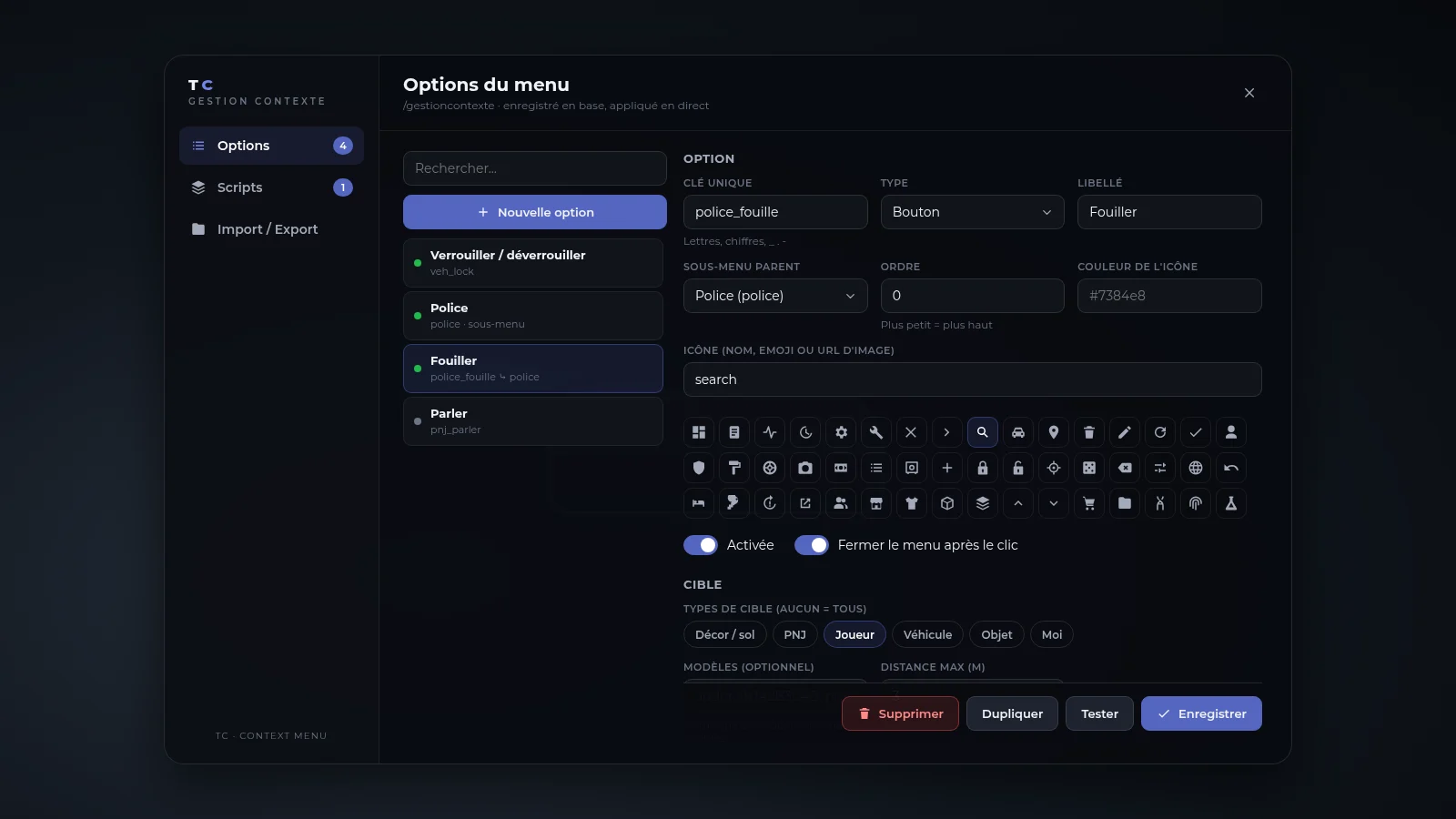
| Tab | Role |
|---|---|
| Options | Create, edit, duplicate, delete, enable or not, test the action, capture a target (click an entity: type and model are filled in) |
| Scripts | Hide, rename or reorder options added by other scripts |
| Integration | Every code example to copy; each option also has a Lua code button generating ready-to-paste code |
| Import / Export | Full JSON (backup, transfer between servers) |
#Option fields
| Field | Role |
|---|---|
type | button, submenu or separator |
parent | Key of a submenu |
target.types | world, ped, player, vehicle, object, self (empty = all) |
target.models | Names or hashes; the option only shows on these models |
distance | Max player → aimed point distance (0 = unlimited) |
require | jobs { name = minGrade }, items { name = qty }, admin, ace, inVehicle, onDuty |
action.type | See below |
#Action types
| Type | Effect | Handler receives |
|---|---|---|
client_event | TriggerEvent(name, ctx, args) | (ctx, args) |
server_event | TriggerServerEvent(name, ctx, args) | (ctx, args) + source |
command | ExecuteCommand(name args) | — |
export | exports[res]:fn(ctx, args) client-side | (ctx, args) |
server_export | exports[res]:fn(src, ctx, args) server-side | (src, ctx, args) |
#The ctx context
| Field | Content |
|---|---|
entityType | Target type |
entity | Entity (client-side only) |
netId | Network id |
model | Model |
coords | Aimed coordinates |
serverId | Targeted player (server id) |
plate | Plate (vehicle) |
distance | Player → target distance |
server_export is re-validated by the server (option exists, job, items, ACE, distance, model) from the definition in the database, never from what the client sends. Other types run client-side: the script receiving a server_event must check for itself what it allows, as with any network event.
#Built-in option pack
Equivalent to the Vision context menu, enabled by default (Config.Pack). On Vision, actions call the same functions, commands and events as the core and read its staff permissions (contextmenu, dev, devcontextmenu, revive, heal, freeze, warn, kick, ban). On other frameworks only generic options are offered and admin is checked by the server.
| Target | Options |
|---|---|
| Player | Search (hands up), Carry · Staff: admin menu, revive, heal, message, inventory, freeze, warn, kick, ban · Dev: armour |
| Self | Detach attached object, clean up, combat on/off |
| Vehicle | Doors (from inside), tow, trunk · Staff: seat, lock, repair, upgrade, customise, delete, player at the wheel · Dev: drift mode |
| Object | Props (duplicate / move / delete) · Staff: copy name / hash / entity / position, duplicate, delete |
| Ped | Staff: copy name / hash / entity / position, duplicate, delete |
| World | Staff: heal the area, repair the area, place a prop · Dev: copy coordinates, teleport, orbital strike |
Orbital strike (world → Dev): 3 s countdown with a red marker on the aimed point (Backspace cancels), then 5 rockets fall from 200 m. Settings: Config.Pack.OrbitalCountdown and Config.Pack.OrbitalDamage. Every strike, deletion, teleport and prop placement is logged in the server console.
Not included (tied to the core's internal systems): sitting on benches, boombox / TV, shared emotes, emote adjustment, job menus (recreate them in /gestioncontexte with a job condition), drug labs.
#Performance
Goal: 0.00 ms idle, ≤ 0.01 ms with the menu open.
- No thread, loop or timer while the menu is closed.
- Menu open: ~7 natives per frame; the hover ray runs every 100 ms and is skipped when the cursor does not move; NUI messages are only sent when the target changes.
- Options are evaluated on open only, never every frame.
- Vision: the big shared object is loaded once in the background, and staff permissions go through a light callback refreshed at most every 60 s without blocking the menu.
Measure: resmon 1 in game (F8), tc-contextmenu column.